
Chrome Update or Alternative?
Chrome Update or Alternative? A reader asks…
I recently saw a browser vulnerability report that urgently recommended I update Chrome to fix four critical vulnerabilities. I generally let the auto-updates do their thing, but is this something I need to jump on right away? And is there a better alternative to Chrome where I don’t need to always be updating the darn thing?
Anytime you hear about an urgent update to any software you use, you should take action to update the software – independently from the communication. Hackers also send out fake messages about updating software, and have a link in the email or text you could click on, supposedly to kick off the update. Don’t click the link! You should only update your installed software (including Chrome) from the app itself. App developers build in an update capability in their software, and is the only safe way to update (short of uninstalling and then downloading and installing the latest version from the software developer’s website).
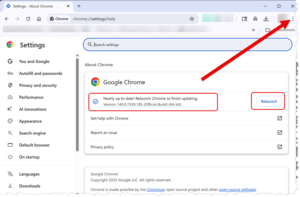
In the case of Google Chrome, your browser window has three vertically aligned dots near the top-right of the window – click that and a menu will pop up. Move your cursor over the Help menu item, and a sub-menu will pop up. Move your cursor over and click on About Google Chrome and a new tab will open and start checking for and installing any available update to Chrome.
You can do this anytime you want, and Google generally issues updates to Chrome at least a few times a month, often more. It only takes a few seconds to check for updates, and if there’s one available, install it and restart your browser when the installation is finished (you’ll be prompted to restart Chrome at the top-right of the window). You can also take the easy way and let Chrome auto-update itself.
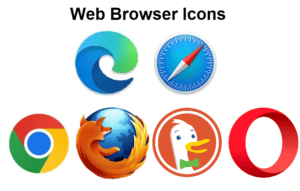
As to your second question, there are alternatives to Google Chrome for browsing the internet (lists below). But all software, including all web browsers, needs to be updated pretty often, so switching to an alternative to Chrome won’t let you avoid the update grind.
- For Windows PCs, Microsoft Edge is built right into Windows.
- For Apple Macs, Safari is built right in.
There are also 3rd party web browsers that work on all platforms, such as:
Any (except for Safari which is Apple-only) of these browsers can generally be installed on whichever type of computer (Mac or PC) you use, as well as tablet and smartphone platforms. If you use a tablet and smartphone as well as a computer, it might make your life easier to use the same web browser on all of them.

Last note about updating software: Don’t put this off for too long. Hackers and scammers are hard at work trying to crack into everybody’s technology, and keeping your computer (and all its’ installed software) up-to-date is a critical piece of the protection of your Digital Life. For why, see my article Update Ad Nauseum. For how, it’s pretty simple: run the appropriate updates for your computer or device on a regular basis – how often is based on you balancing the time it takes to do this against the risk of outdated software compromising your Digital Life and identity.
- For Microsoft Windows, the Start>Settings menu has Windows Update, and you should turn on automatic updates as well as getting updates for other Microsoft software. If you use Microsoft Office apps, there’s an update button in the File>Office account page. For any 3rd party apps that you’ve installed, you’ll have to check them, the update feature location varies by software developer.
- For Macs, the Settings>General>Software Update menu checks for and lets you install all updates to Apple software. Like Windows, you’ll need to check 3rd party apps for updates separately.
This website runs on a patronage model. If you find my answers of value, please consider supporting me by sending any dollar amount via:

(@PosiTek)

(Support@PosiTek.net)

(using any credit card)