
Windows Update?

Windows Update? A reader asks…
I have a Windows 11 desktop PC and follow your advice to check for updates regularly. I read that Microsoft released the update 25H2 on September 30th. I checked my system, and I’m still on 24H2. I ran Windows Update, but it didn’t show the 25H2 update. What should I do to get the latest update?
Microsoft rolls out these major Windows updates gradually, for two good reasons: First, the early rollout ‘victims’ can report on any nasty bugs that the software developers missed in testing. This gives Microsoft a chance to fix major problems before the masses of Windows users get hit with the update. The second reason is that a gradual rollout means that their update servers aren’t stressed as hundreds of millions of Windows PCs attempt to download the update at the (relative) same time.
For most people, it’s fine to wait till the update is rolled out to your system. While the 25H2 update includes many updated components, Microsoft ensures that older systems don’t miss out on important security updates, so your 24H2 system still receives many updates from Microsoft.
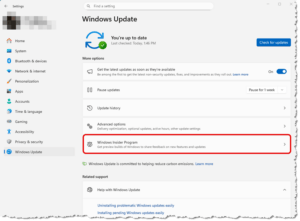
For those who want to take the risk of getting Windows updates early, they can sign up for the Windows Insider Program, which is right on the Windows Update page. Click the > arrow on the right side and follow the signup screens to do this. But think hard about doing this, as you’re signing up for pre-release updates that may be buggy and cause instability on your PC.
There are other ways to get the 25H2 update faster than using the Windows Update utility. You can download the Windows Media Creation Tool to create an installation thumb drive (see these Microsoft instructions) or use the Windows Installation Assistant (see these Microsoft instructions). Be aware that these are not simple, click a button and wait; you have to do a bit of work.

My advice is to wait for your Windows Update utility to offer the 25H2 update. While the 25H2 update includes some nice security enhancements, WiFi 7 support, and improvements to various apps and utilities (like File Explorer and Notepad), it doesn’t include anything most people would consider a critical factor. It does have enhancements to the AI tool (CoPilot), but I don’t think that’s important enough to spend time working to get the update before it’s rolled out to your PC.
This website runs on a patronage model. If you find my answers of value, please consider supporting me by sending any dollar amount via:

(@PosiTek)

(Support@PosiTek.net)

(using any credit card)
 Author: Chris Gardner
Your Tech Coach at PosiTek.net
Author: Chris Gardner
Your Tech Coach at PosiTek.net
There are currently 1299 reader comments on published articles, care to join in? Use the Leave a Comment form below/at the bottom of any existing comments. This is a good place to ask follow-on questions on this subject.